
TOP QUALITY
EXPERT SUPPORT
SCALABLE SOLUTIONS
EXPRESS SHIPPING
AdobeStock 594064495
Event tech, How to guides, Tips and advice

Facial recognition for event check-ins: Is it right for your event?

An attendee walks up to a kiosk. A camera recognises their face, their name appears on screen, and their badge prints moments later. No ticket, no email search, no registration desk. Facial recognition is widely touted as great progressive step for onsite registration, saving time for attendees and cutting queues at the door. Event managers are tempted by the use of AI as a way to showcase their event as cutting edge. The technology itself has matured. Testing by the US National Institute of Standards and Technology has found that leading algorithms now identify people with over 99.5% accuracy under test conditions.¹ But does it really deliver what it promises at a live event? Does it solve a problem that needed solving, and does it introduce its own issues? Having looked at it closely, we think the honest answer for most organisers is: it’s not a silver bullet for registration. This view has come about for reasons you may not expect, so let’s walk through where facial recognition genuinely helps, where the promise stumbles, and why the humble QR code is harder to beat than the marketing suggests. How facial recognition check-in works The process has three stages. Attendees upload a photo of themselves during online registration, and the image is stored securely against their booking. At the event, a camera at a kiosk or entry point scans each arriving face and maps key features, such as the distance between the eyes and the shape of the jawline, against the registered photos. On a match, the attendee is confirmed and their badge prints. In practice it runs alongside other entry methods rather than replacing them, offered as an opt-in for attendees who want it. The real advantages There are genuine benefits, and they are worth stating fairly. It reduces badge re-print fraud A badge tied to a face is hard to game. Where organisers see attendees requesting duplicate badges to pass to colleagues or non-registered guests, facial recognition closes that gap. The person collecting the badge is verifiably the person who registered, and the system records who has already been issued one. It can help track flow through the event If facial recognition is used beyond the entrance, at session doors or zone entries, it can build a picture of how attendees move through the event without anyone scanning anything. That data has value for planning room sizes, catering, and future agendas. The caveat is reliability: it should be treated as a useful indicator rather than a complete record, for reasons covered below. Those are the strongest cards in the deck. Notice that neither of them is the one usually advertised: speed at the door. Where the promise breaks down The photo problem The biggest practical issue comes before the event, not at it. The system can only recognise attendees who have supplied a suitable photo in advance, and a portion of any audience simply won’t. Some forget. Some struggle to find or take an acceptable headshot. Some decline on data protection grounds. Of those that do it, the headshot won’t be fit for purpose for all of them. They may use a social media profile where the system takes the photo from their profile – but your visitors probably weren’t thinking about making their photo a nice, standard, AI friendly one when they took their photo for their Facebook account. For those who do comply, you have already added friction to their pre-event registration in exchange for saving them possibly a few seconds onsite. That is a poor trade for the attendee. Event marketers know that any friction in pre-registration reduces completion rates. The simpler the registration form, the more registrations you get. Partial opt-in undermines the whole system As soon as we accept that some attendees opt in and others don’t, we have to have multiple registration methods available onsite. The simplicity introduced by facial recognition becomes re-complicated again by having different registration flows onsite. And there’s a quieter cost. If you are using facial recognition for event flow data inside the event, partial opt-in can invalidate it. A movement picture built from the 60% of guests the cameras can recognise tells you about those guests, not about your event. Any analysis that assumes full coverage will be misleading. Recognition was never the bottleneck Watch a busy registration area, and the queue rarely forms at the identification step. It forms at badge printing and around human behaviour: attendees stopping for a chat, standing in front of the printing hardware while they work out where they have to go next, or hunting through their bags while others wait behind them. Facial recognition speeds up the one part of the process that was already incredibly quick. Scanning a QR code is at least as instant as positioning yourself for a camera, and most attendees are now well practised at it. The slow parts of check-in stay exactly as slow as they were. It is not 100% reliable Even the most polished consumer implementation makes mistakes. Apple’s Face ID, refined across hundreds of millions of devices, is known to confuse close family members, with relatives occasionally able to unlock each other’s phones.² Event systems face harder conditions: venue backlighting, glasses, hats, poor photos to compare to, and a haircut between registration and arrival. Every failed match diverts someone to a manual desk, so the fallback process and the staff to run it remain a necessity. The 99.5% laboratory figure does not survive contact with a conference foyer unchanged. Early recognition sounds better than it works One advertised benefit is spotting attendees on their way in, before they reach the registration desk, so their badge is waiting for them. In practice this is less useful than it sounds. Recognise someone too early, and they may be picked up at the wrong station or change course on their way across the foyer, leaving a printed badge wasted at a desk they never reached. The system still cannot safely print until the attendee

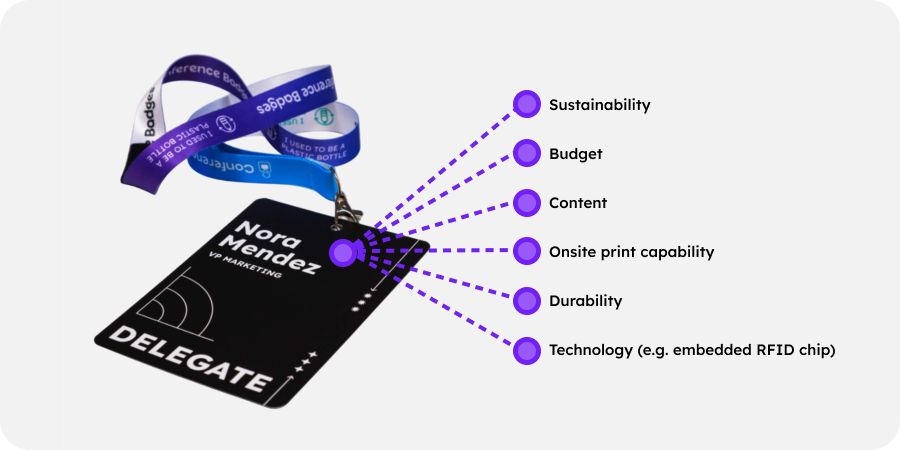
6 qualities badges
How to guides, Tips and advice

Badge design mistakes every Event Organiser has made at least once

Decisions regarding badges made weeks before your event can cause real problems on the day. Most of these mistakes are invisible until badges are in attendees’ hands, an exhibitor’s scanner fails to read a QR code, or a delegate queue snakes back through the registration hall. 1. Leaving it too late For those new to event organising, badge ordering is almost always a last-minute thought. It shouldn’t be. A printed badge order involves artwork approval, attendee data sign-off, print production, and delivery. Each step takes time. Each step has a point at which an issue can be caught and corrected. Compress the timeline and you remove those checkpoints. You may also increase the cost due to rush fees. Plan to have your printed lanyard order placed at least three weeks before the event. That window gives you time to receive and review a proof, and still have a buffer if, worst case, something needs to be reprinted. For badges, don’t hold on to both your artwork and your data until the last minute, just because your data is still subject to last-minute registrations. Holding both back means your artwork won’t get discussed early enough and the setup and proofing process gets compromised. Your badge supplier can set up your artwork proof and get your approval long before your data is due to arrive. Given that your event brand has probably been agreed months ahead of the event, having sufficient design assets to get a badge proofed shouldn’t be an issue, so it’s something you can get off your tick list early. If your event timeline genuinely cannot accommodate that, onsite badge printing removes the dependency on pre-event production entirely. Badges get printed as delegates arrive, which means last-minute attendee additions and name changes are handled at the desk, not by phone to a printer the night before. Conference Badges offers onsite badge printing across the UK, with badges produced in six seconds per delegate. 2. Text too small to read at a glance Two things usually matter more than anything else on a badge: first name and organisation / company name. They are the two most important pieces of information on any personalised event badge. They sort out two important needs in networking: They avoid the embarrassment of not knowing someone’s name when you meet them They help people network by allowing them to spot who works for a company that they want to deal with. But both are regularly printed too small. Usually because the designer wanted the branding to jump out, or copious amounts of whitespace. We understand design principles mean good use of whitespace, but don’t kill the function of a badge for it. A badge works at arm’s length, or it does not work at all. If someone needs to lean in to read a delegate’s name, the badge has failed its primary job. The delegate’s first name should be the largest element on the badge. Company name sits below it, noticeably smaller but still legible from a metre away. This matters beyond simple legibility. At a conference or exhibition, attendees scan badges in seconds to decide whether someone is worth approaching. Exhibitors scan to qualify leads before committing to a conversation. A badge where the name is illegible slows that down and creates awkward “is he staring at my chest?” moments. Good badge design serves the attendee first, not the organiser’s brand. Before approving a badge design, print a test sheet and read it from a standing distance. What looks fine on screen often reads differently in print. In contrast, dark text on a light background is readable under all lighting conditions. White text on a coloured or photographic background is frequently not. This also matters for delegates with visual impairments. If your event has accessibility commitments, high-contrast typography is non-negotiable, not a design preference. 3. Not printing both sides, and then badges flip around A badge printed on one side only will rotate. Lanyards pivot, attendees move, and within minutes a proportion of your delegates are walking around with a blank white reverse facing outward. Printing both sides solves this. The reverse can carry event branding, session information, sponsor details, or a QR code. It can also carry genuinely useful reference content for delegates: the venue Wi-Fi password, a session timetable, a floor plan, or an emergency contact number. Even a simple repeat of the front design is better than a blank white panel. If budget or production time rules out double-sided printing, a heavier cardstock reduces rotation. It is not a complete fix, and double-sided is always preferable. One additional fix: double-clip lanyards. A standard single-clip lanyard lets the badge swing freely. A double-clip version holds the badge at two points, keeping it flat against the body and consistently facing outward. It is a small detail with a visible difference across an entire event. 4. Choosing the wrong badge material for your event Not every event needs the same badge. The material you choose affects durability, print quality, and how the badge holds up across a full day or multiple days of wear. Card stock is the standard choice and works well for most single-day events held indoors. For a two-day conference or an event with outdoor elements, a heavier card or laminated finish prevents badges from going soft at the edges or becoming difficult to read by day two. Material choice also carries a signal about your event’s values. Single-use plastic for one-day indoor events isn’t a great green signal, although you can allay some of the concern by letting guests know that PVC is 100% recyclable (and you can help make sure it is recycled). But there are also now practical alternatives that do not compromise on quality, such as recycled card and compostable card. If sustainability is part of your event’s positioning and values, your badge should reflect it. Conference Badges supplies badges made with sustainably sourced FSC-certified card and other sustainable materials. The one thing to avoid: choosing material based

Scroll to Top