
TOP QUALITY
EXPERT SUPPORT
SCALABLE SOLUTIONS
EXPRESS SHIPPING
AdobeStock 594064495
Event tech, How to guides, Tips and advice

Facial recognition for event check-ins: Is it right for your event?

An attendee walks up to a kiosk. A camera recognises their face, their name appears on screen, and their badge prints moments later. No ticket, no email search, no registration desk. Facial recognition is widely touted as great progressive step for onsite registration, saving time for attendees and cutting queues at the door. Event managers are tempted by the use of AI as a way to showcase their event as cutting edge. The technology itself has matured. Testing by the US National Institute of Standards and Technology has found that leading algorithms now identify people with over 99.5% accuracy under test conditions.¹ But does it really deliver what it promises at a live event? Does it solve a problem that needed solving, and does it introduce its own issues? Having looked at it closely, we think the honest answer for most organisers is: it’s not a silver bullet for registration. This view has come about for reasons you may not expect, so let’s walk through where facial recognition genuinely helps, where the promise stumbles, and why the humble QR code is harder to beat than the marketing suggests. How facial recognition check-in works The process has three stages. Attendees upload a photo of themselves during online registration, and the image is stored securely against their booking. At the event, a camera at a kiosk or entry point scans each arriving face and maps key features, such as the distance between the eyes and the shape of the jawline, against the registered photos. On a match, the attendee is confirmed and their badge prints. In practice it runs alongside other entry methods rather than replacing them, offered as an opt-in for attendees who want it. The real advantages There are genuine benefits, and they are worth stating fairly. It reduces badge re-print fraud A badge tied to a face is hard to game. Where organisers see attendees requesting duplicate badges to pass to colleagues or non-registered guests, facial recognition closes that gap. The person collecting the badge is verifiably the person who registered, and the system records who has already been issued one. It can help track flow through the event If facial recognition is used beyond the entrance, at session doors or zone entries, it can build a picture of how attendees move through the event without anyone scanning anything. That data has value for planning room sizes, catering, and future agendas. The caveat is reliability: it should be treated as a useful indicator rather than a complete record, for reasons covered below. Those are the strongest cards in the deck. Notice that neither of them is the one usually advertised: speed at the door. Where the promise breaks down The photo problem The biggest practical issue comes before the event, not at it. The system can only recognise attendees who have supplied a suitable photo in advance, and a portion of any audience simply won’t. Some forget. Some struggle to find or take an acceptable headshot. Some decline on data protection grounds. Of those that do it, the headshot won’t be fit for purpose for all of them. They may use a social media profile where the system takes the photo from their profile – but your visitors probably weren’t thinking about making their photo a nice, standard, AI friendly one when they took their photo for their Facebook account. For those who do comply, you have already added friction to their pre-event registration in exchange for saving them possibly a few seconds onsite. That is a poor trade for the attendee. Event marketers know that any friction in pre-registration reduces completion rates. The simpler the registration form, the more registrations you get. Partial opt-in undermines the whole system As soon as we accept that some attendees opt in and others don’t, we have to have multiple registration methods available onsite. The simplicity introduced by facial recognition becomes re-complicated again by having different registration flows onsite. And there’s a quieter cost. If you are using facial recognition for event flow data inside the event, partial opt-in can invalidate it. A movement picture built from the 60% of guests the cameras can recognise tells you about those guests, not about your event. Any analysis that assumes full coverage will be misleading. Recognition was never the bottleneck Watch a busy registration area, and the queue rarely forms at the identification step. It forms at badge printing and around human behaviour: attendees stopping for a chat, standing in front of the printing hardware while they work out where they have to go next, or hunting through their bags while others wait behind them. Facial recognition speeds up the one part of the process that was already incredibly quick. Scanning a QR code is at least as instant as positioning yourself for a camera, and most attendees are now well practised at it. The slow parts of check-in stay exactly as slow as they were. It is not 100% reliable Even the most polished consumer implementation makes mistakes. Apple’s Face ID, refined across hundreds of millions of devices, is known to confuse close family members, with relatives occasionally able to unlock each other’s phones.² Event systems face harder conditions: venue backlighting, glasses, hats, poor photos to compare to, and a haircut between registration and arrival. Every failed match diverts someone to a manual desk, so the fallback process and the staff to run it remain a necessity. The 99.5% laboratory figure does not survive contact with a conference foyer unchanged. Early recognition sounds better than it works One advertised benefit is spotting attendees on their way in, before they reach the registration desk, so their badge is waiting for them. In practice this is less useful than it sounds. Recognise someone too early, and they may be picked up at the wrong station or change course on their way across the foyer, leaving a printed badge wasted at a desk they never reached. The system still cannot safely print until the attendee

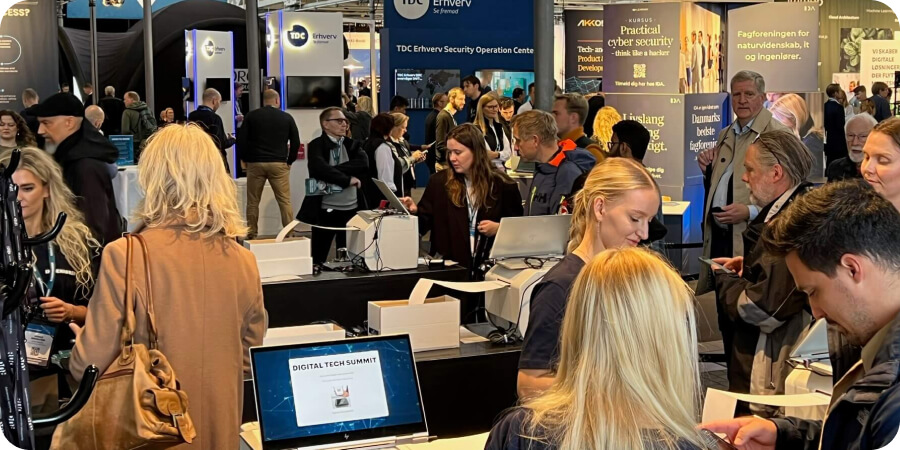
late event registrations - Busy conference registration desk with staff checking in attendees on laptops at the Digital Tech Summit, with crowded exhibition hall and booths visible in the background. late event registrations
Event tech, Tips and advice

When should you close registrations for your event?

How about never? If your event isn’t full in the days before it goes live, closing registration early usually means one thing: you’re turning people away. Whether it’s a paid event or free to attend, the objectives are likely linked to attendance numbers, so it makes little sense not to allow them to be maximised. Late registration isn’t bad. It’s normal, it’s human, and the data backs it up. People wait until the last minute because budgets get approved late, diaries shift, or someone sees a LinkedIn post the day before and decides they should attend. And much to the chagrin of many event organisers, the trend to register late is on the rise. According to Maritz’s Registration Report, 45% of attendees sign up in the last four weeks, 22% in the final week, and about 9% register onsite. That’s a huge portion of your audience making decisions at the last minute. Closing registration early doesn’t reduce stress, it just reduces ticket sales. With onsite badge printing and modern event technology using integrated systems, there’s no reason attendance should be held back by outdated processes. Two deadlines every event needs As an event planner, it helps to think in terms of two separate dates: Planning freeze: when you lock what needs locking: catering numbers (with a reasonable buffer), staff schedules, and exhibitor lists. This keeps logistics manageable. Online registration cutoff: when you stop accepting sign-ups online and switch to onsite registration. A staffed desk, scan-and-print badges, and a clear “register when you arrive” message. You’re not closing the door. You’re opening a different one. When to set the pre-registration cut-off Consider what a last minute registration changes for the event. For many events, the capacity’s there. You may even have more than enough capacity once you take into account no shows. If you see ‘go shows’ (attendees who turn up without pre-registering) as natural substitutes for ‘no shows’, the issue becomes less bewildering. In many cases, it’s just a name badge swap. But even that only applies if you pre-print badges offsite. If you’ve got onsite badge printing capabilities then you don’t have this worry. It’s a legitimate concern to think your helpdesk may be overwhelmed with manually keying in on site additions. But if you take advantage of an API to integrate your registration platform with your badge printing system, you can encourage last minute attendees to register on their phones and their data will be ready for badge printing when they get to the registration desk. So for many events, late registrations only cause problems when your badge process can’t handle them. A practical three-step approach: Step 1: Incentivise early registration with early bird pricing, or additional incentives (free coach transfer, VIP upgrade, lounge access, food vouchers). Step 2 (optional): For pay-to-attend events, add a late registration tier, not as a penalty, just a different process. “Late registration (onsite) includes badge printing and staff assistance.” Step 3: Plan for the surge. Extra staff during peak arrival windows, a dedicated lane for new registrations, and emergency badge stock all help keep check-in moving. It really helps here if you have arrival time data from previous iterations of the event, or comparable events you’ve been an insider on. How Conference Badges supports late registration Many badge suppliers are set up for one scenario: print everything in advance and hope the list doesn’t change. But attendee lists always change. Conference Badges is built around flexibility: onsite badge printing, QR code and RFID badges and last-minute data edits are expected. That means you can keep taking registrations during the event without check-in falling apart. We integrate with many key event registration platforms, such as Eventbrite, Stova or Swoogo, so guests can even register in the queue and still pick up their name badge with no delays. Quick check: can your event keep registration open? If most of these apply, you’re in a good position to stay open longer: You can print badges on demand onsite Your process handles last-minute data changes You have enough staff planned for peak arrival You carry backup badge stock and can reprint quickly Check-in includes QR code scanning for speed Catering numbers can be adjusted without high expense There are simultaneous sessions attendees can go to, e.g. if the main sessions are full If not, an earlier online cutoff is the safer option but it’s worth exploring what would need to change. Want to keep registration open longer? Conference Badges can support late registrations with onsite badge printing and scan-and-print workflows so you don’t lose attendees just because they signed up late. Get in touch for more help
Pre-printed badges vs. onsite event badge printing
Event tech, How to guides, Tips and advice

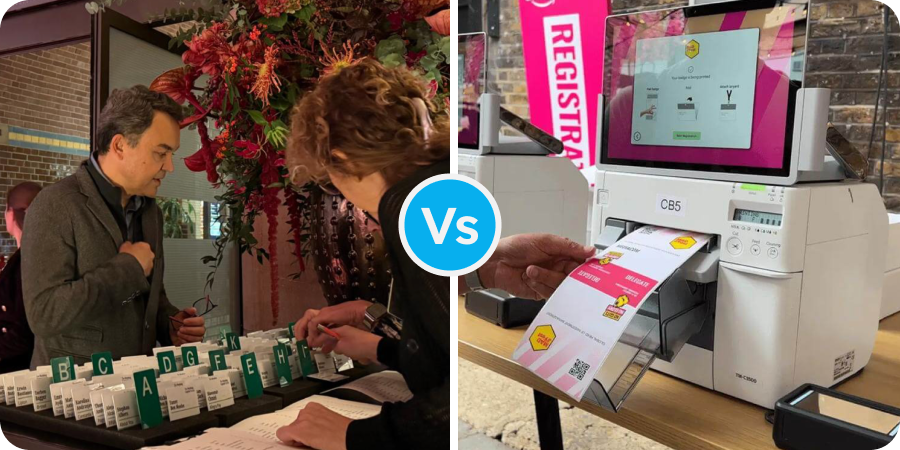
Pre-printed badges vs. onsite event badge printing

When you go to a conference, the first interaction you often have is collecting your name badge. It’s a small thing that has a big impact on everything from first impressions to how well you network. But there is a key decision behind that simple badge: should you print your conference badges ahead of time or use onsite badge-printing equipment? Event planners make big budget savings and reduce queues by simply picking the appropriate badge-printing method for their event. Pre-printed badges vs. onsite event badge printing? There isn’t one way to print badges that works for everyone. The method you choose will impact your workflow, budget, and the quality of your custom badges. It will change the arrival experience and so reflect on the event, overall experience and your brand. You can get pre-printed conference badges made before your event using professional printing services or your own equipment. Designs are finalised, attendee data is combined, and event name badges are made, often weeks in advance.  These badges come ready to hand out, sometimes with lanyards and badges already put together. For small events where you know the majority of who will be attending well in advance, this is often the best model. Onsite badge printing is a very different approach. You don’t have to personalise any badges ahead of time; instead, badge-printing equipment at your event prints name badges as delegates arrive, on demand. A name badge printer prints attendees’ credentials in real time as they check in, pulling information directly from your registration system. Understanding how badge printer technology and materials work makes it possible to choose between these two options.   Badge printer technologies Several printing technologies are competing for your attention when it comes to event badge printers.  Printers that work directly with heat ‘Direct thermal’ printers are a common type of onsite badge printer. They use badge materials that go from white to black when they come into contact with the printer’s thermal printhead. Just heat and paper that has been treated in a special way to react to the heat. No ink, ribbon, or cartridges. These name badge printers are great at printing black on white quickly. They are generally small and fit easily on registration desks, and because they don’t need any supplies other than the badge stock, they’re reliable, and operational costs are easy to predict. What are the limitations of thermal printing? Direct thermal printing produces only black-on-white output. The badge material must already have any logos, branding, or colour-coding on it. The printer can only add names, companies, and job titles for each attendee.  Badges also fade over time when exposed to heat or sunlight, which is fine for events that last only one day but not so great for conferences that last several days and where people keep their badges as souvenirs. Thermal transfer printers ‘Thermal transfer’ badge printing machines use ribbons (like a thin plastic film) to transfer ink onto badge materials, giving them more options. This method works with regular paper, synthetic materials, and even some kinds of plastic. What is the main benefit over ‘direct thermal’? You can use regular paper stock, which is much cheaper than heat-sensitive materials. Thermal transfer also makes prints that last longer and won’t fade.  Thermal transfer printers print black text with sharp quality but are less suited to images unless they are simply black and white images. Even grayscale images are a struggle for these printers. Having a print ribbon also means you have another consumable to change and keep stocked up on. Inkjet badge printers Inkjet badge printers can give a little more flexibility to your onsite badge printing. Depending on the model of printer, you can print on stock such as ‘Butterfly Peel & Fold Badges’ and may be able to print in full colour onsite, producing bright, full-colour name badges that can be personalised with photos, logos, and detailed graphics. Inkjet badge printers often produce results comparable with pre-printed ones. You can print everything, including artwork onsite so last-minute design changes won’t ruin your event.  What are the trade-offs? Inkjet printers can be more expensive to run than thermal printers, mainly due to ink costs, and for the really fast ones that are best suited to onsite use, it can be more expensive to hire inkjet badge printers. Printing speeds are typically slower: 6 to 10 seconds per badge, compared to 1 to 2 seconds for thermal options. Printers that print directly on cards (PVC) Direct-to-card badge printing makes plastic badges that look like credit cards or ID cards for high-end conferences. These printers for conference badges use dye-sublimation technology to print pictures directly onto PVC card stock. PVC badge printers make prints that look great and last a long time. These custom badges can withstand events lasting a lot longer than one day without showing wear. They can also include access-control encoding and give off a high-end, professional look. What are the problems with dye-sub? These name badge printers cost a lot of money, usually between £1,000 and £4,000. PVC card stock costs a lot more per unit than paper badges, and it takes longer to print, usually 30 to 45 seconds per card. You need users who are trained on these printers to set up and run them properly. For most conferences, direct-to-card printing only makes sense if the extra cost is worth it for security, durability, or prestige. The conventional way: Pre-printed conference badges For good reasons beyond tradition, pre-printed badges are still the most common type at many events. The benefits of pre-printing When you don’t have to worry about the limitations of onsite equipment, you can design a lot more. Professional print shops can make name badges for events using methods that no portable badge printing machine can match. These include printing on thicker card stock with metallic inks, speciality papers, textured finishes, die-cut shapes, lamination, and spot UV coatings. These custom badges make a statement that basic thermal printing can’t match

Scroll to Top